
Williamson county
republican party
Keeping Williamson County, Williamson County.
Upcoming Events
If we lose Texas, we lose America. Get involved today!
Knock Doors with the Wilco GOP!
Date November 7, 2026Time 9:00 am
Volunteer for victory every weekend!
Never knocked doors before? We got you! We can pair you with a more seasoned block walker so that you can learn as you go!
Knock Doors for Republicans!
Date November 7, 2026Time 9:00 am
Every Saturday between August and mid-October, we will be meeting up to knock doors for our entire Republican ticket! Join us to engage with voters, share our message, and achieve victory in November!
Meetup location changes each week and the website will be updated ...
Meetup location changes each week and the website will be updated ...
Knock Doors for Republicans!
Date November 7, 2026Time 9:00 am
Every Saturday between August and mid-October, we will be meeting up to knock doors for our entire Republican ticket! Join us to engage with voters, share our message, and achieve victory in November!
Meetup location changes each week and the website will be updated ...
Meetup location changes each week and the website will be updated ...
Paxton's Patriots Meetup
Date November 9, 2026Time 6:00 pm
Join us at Smokie Mo's in Georgetown on Monday evenings from 6-8pm where we will laugh, have a great time and show you how to help GET OUT THE VOTE for Ken Paxton and all the other great candidates d...
True Texas Project - Wilco Monthly Meeting
Date November 10, 2026Time 6:30 pm
Phone Banking
Date November 11, 2026Time 1:00 pm
Want to make a difference but can’t knock doors?
Join us every Wednesday as Lou Minick from Texans for Greg Abbott leads our phone banking and texting ef...
Become A Precinct Chair
Help Keep Wilco Red, Apply Today!
2024-2026 Appointment
If you are interested in being appointed to serve as a Precinct Chair for the remainder of the 2024-2026 term, please follow the steps listed below:
1.Verify your precinct is vacant by selecting the Secretary Of State (SOS) link below.
2. Complete and submit the “2024 – 2026 Appointment Application” through link below.
Please Note:
- You must live in the precinct you would like to serve in.
- Applicant’s Republican voting records are verified. If you are new to Williamson County, please provide your previous address for us to verify your Republican voting history.
- Being appointed as a Precinct Chair does not automatically place you on the ballot for the next primary election.
3. Fill Out the Application
Complete the fillable form and download it to your computer.
- Send the Completed Application
Email the completed application to:
4. How to Sign the Application
You may choose one of the following methods to sign your document:
- Manual Signature:
- Print the downloaded form.
- Sign it manually.
- Scan the signed form.
- Email it to both the Chairman and Secretary.
- Digital Signature (PDF):
- Open the downloaded PDF.
- Click the fillable PDF icon in the top right corner.
- A signature icon will appear on the left.
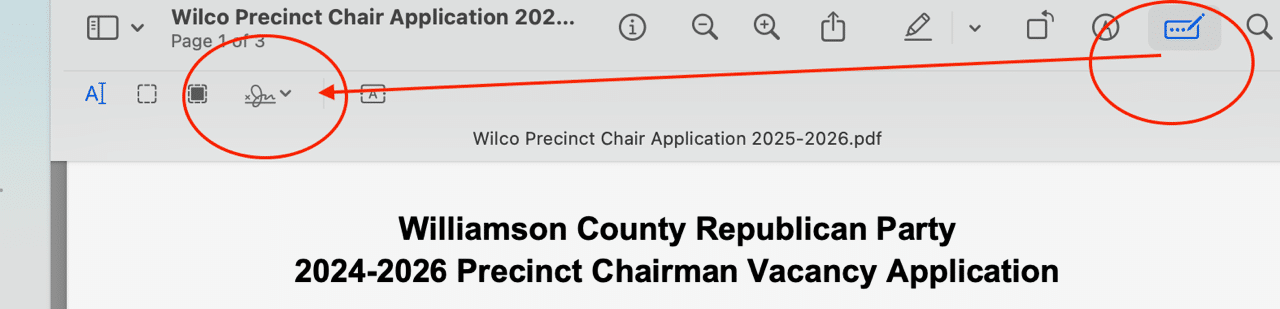
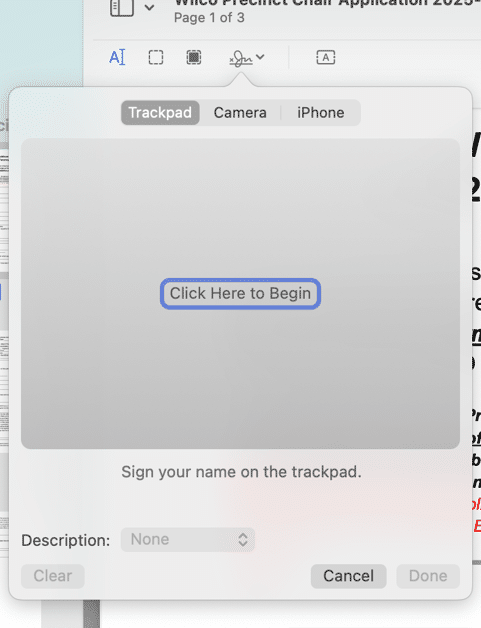
- Use your trackpad to draw your signature, or select a script font to insert your name.
- Save the signed document and email it as instructed above.


elected officials
Keep Wilco Red


